
Tokens, Context & Sessions
Tokens
A token is the smallest unit a LLM processes. It is not necessarily a word, but a chunk of characters. Tokenization is model-dependent.
How counting works
| Rule of thumb | Value |
|---|---|
| 1 token | ≈ 4 characters (English) |
| 1 token | ≈ ¾ of a word |
| 100 tokens | ≈ 75 words |
| 1,000 tokens | ≈ 750 words ≈ 3 pages |
| 1,000,000 tokens | ≈ 750,000 words ≈ 5–6 full-length novels |
Why "192.168.1.1" = 7 tokens, not 1
LLMs learn to tokenize from natural language — words and common fragments become single tokens. Numbers and punctuation don't follow those patterns, so they get split individually:
192·.·168·.·1·.·1→ 7 tokens
The same applies to JSON keys, XML tags, code symbols, and UUIDs — structured or technical text is far more token-expensive per unit of meaning than plain prose.
Token efficiency by data format
| Format | Relative token cost | When to use |
|---|---|---|
| Plain text | Low | Default and most token-efficient |
| JSON | 2–3× plain text | Automation requiring structured parsing |
| XML | 2–4× plain text | Only when mandatory |
Input vs output tokens
| Token type | What you're charged for | Relative cost |
|---|---|---|
| Input | System prompt + history + your message + files | 1× baseline |
| Output | Every token the model generates in response | 3–5× input |
Token-based pricing is straightforward: you pay for what you use. Most AI providers charge separately for input tokens and output tokens.
Total Cost = (Input Tokens × Input Price) + (Output Tokens × Output Price)
Example: a 500-token prompt that returns a 200-token response using GPT-4:
- Input cost: 500 × $0.01 / 1,000 = $0.005
- Output cost: 200 × $0.03 / 1,000 = $0.006
- Total: $0.011 per request
This seems cheap for a single request. Multiply by 10,000 daily users and you're looking at $110/day or $3,300/month. Scale matters.
Pricing tiers
| Model Tier | Example | Input (per 1M) | Output (per 1M) |
|---|---|---|---|
| Budget | Claude Haiku, mini models | up to $0.25 | up to $2.00 |
| Mid-range | GPT-5 / Claude Sonnet | up to $3.00 | up to $15 |
| Premium | Claude Opus | up to $5.00 | up to $25 |
Context Window
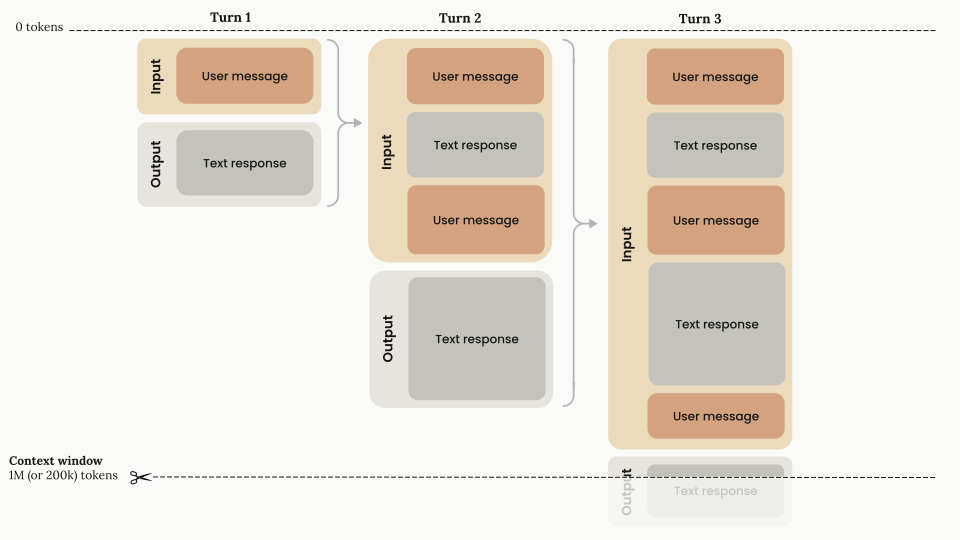
The context window is the model's working memory — everything it can see in one request:
- The system prompt instructions
- The conversation history
- Your current prompt
- Files, tool outputs, and search results
- The model's response
A 1M-token window fits roughly 750,000 words, but size alone doesn't guarantee quality. Clean, relevant context matters more than just stuffing in more information.
Context rot
Context rot happens when too much irrelevant or repeated information in the context window degrades the model's ability to focus. It doesn't fail obviously — it just gives subtly worse answers over time.
| Fill level | Typical behaviour |
|---|---|
| < 30% | High accuracy, fast recall |
| 30–70% | Slight degradation, still reliable |
| > 70% | Noticeable memory issues, possible contradictions |
| Near full | Automatic truncation, smart compression |
Sessions
A session is a single conversation with an AI agent. As your session grows (with file reads, command outputs, and conversation history), you eventually hit limits. This is called context pollution.
| Problem | What Happens | Fix |
|---|---|---|
| Incorrect Information | Agent works with outdated or wrong data | Clear and restart |
| Missing Information | Critical context is missing | Fetch |
| Too Much Noise | Irrelevant logs and tool outputs clog the context | Use sub-agents, reset session or compact |
For strategies on managing context during a session, see Token Saving Strategies.