
GitHub Copilot Business Standalone License Request via IDM
This section explains how to request and obtain a GitHub Copilot Business Standalone license through the msg One Identity Manager (IDM) portal.
Step 0 — Request the License in IDM (One Identity Manager)
Before doing anything else, you must have an approved license. The license request is submitted through the msg internal One Identity Manager (IDM) portal.
Step 1 — Access the IDM Portal
- Open the One Identity Manager (IDM) portal.
- Make sure you are logged in with your msg credentials.
Step 2 — Search for the GitHub Copilot License
- From the top navigation bar, click Request.
- In the search bar, type:
copilot - From the search results, select:
- GitHub Copilot Business Standalone
- Monthly cost: 22.5 €
- Click Add to cart for this item.
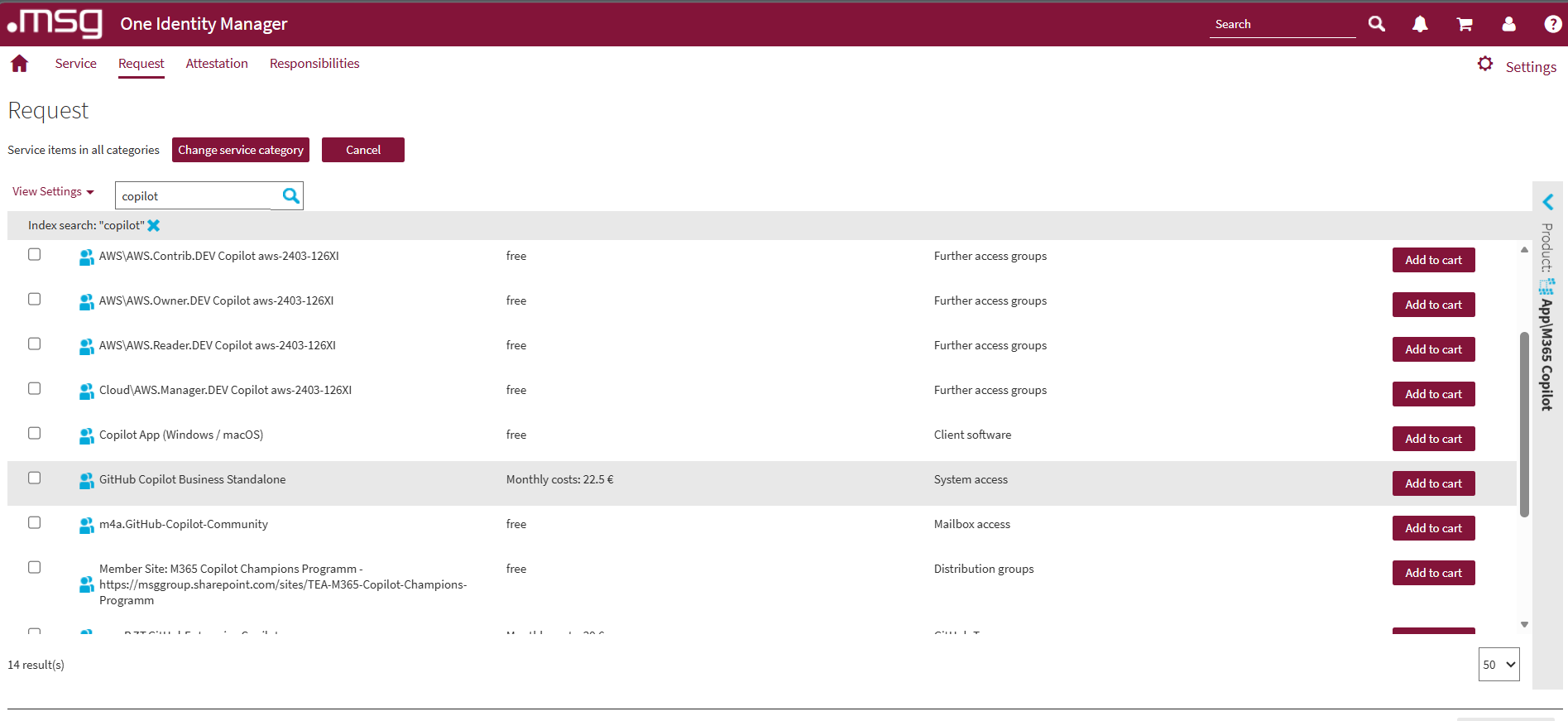
Screenshot: One Identity Manager — search for 'copilot' and select GitHub Copilot Business Standalone
Step 3 — Complete the Request
- Click the shopping cart icon in the top-right corner.
- Select Checkout.
- Add the request justification:
- Project AI Adoption Layer 1
- Submit the request.
Confirmation Emails
After submitting the request, you will receive:
✅ Confirmation from IDM
- Sender:
no-reply-idm-prod@msg.group
- Sender:
✅ Access confirmation from GitHub
- Sender:
noreply@github.com - Your GitHub username will follow this format:
FirstName-LastName_msgcp
- Sender: